From Noticeboard to Group Chat: How Neighbours Share Information
See how neighbours share information on noticeboards and group chats, and learn to trace what each format displays, preserves and passes along.
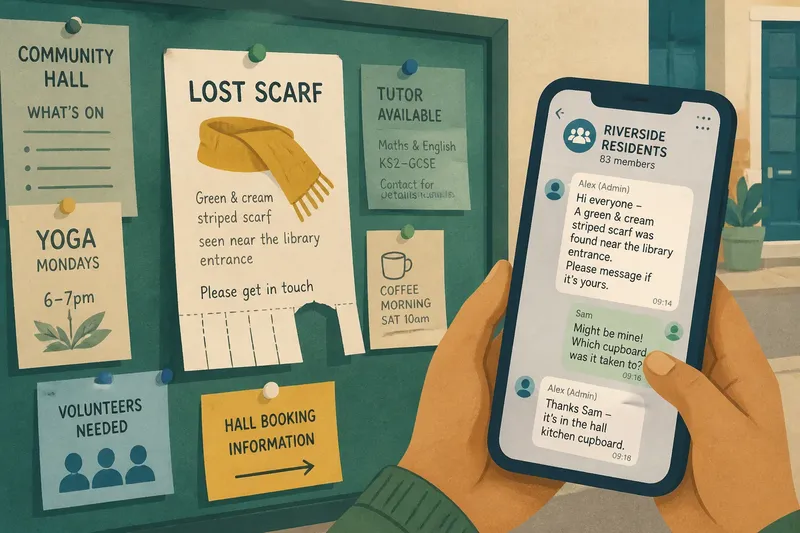
You stop beside the noticeboard outside the community hall to read a flyer about a lost scarf. A neighbour glances at a phone and says the owner has already posted in the street group. The two messages concern the same small event, but they reach people in different ways. To understand how neighbours share information, follow a message from its first appearance to the point where it is noticed, kept or passed on.
Where does a neighbourhood message begin?
Start with a place where information is deliberately left for others: a library entrance, a shared laundry room, a hall foyer, a shop window or a building’s communal lobby. Look for the noticeboard’s position before reading its contents. Is it beside the door people use every day, tucked around a corner, or visible only to visitors who stop and look?
Noticeboards make information public in a particular, physical sense. A person can encounter a notice without knowing who posted it or belonging to a group. But they must come within view of it. A board near a bus stop may be seen during a routine wait; one behind a reception desk may depend on opening hours or permission to enter.
Take in the whole board before focusing on one sheet. A cluster of handwritten cards, printed leaflets and carefully arranged notices can reveal how people use it. A bold heading may catch the eye; a smaller handwritten note might be readable only at close range. The board’s location, lighting and clutter all affect which messages are easy to notice.
What does the physical board make visible?
Read for practical details, then notice what has been added or changed. A flyer may be crossed out, covered by a newer sheet or marked with a handwritten contact number. A tear-off strip may be partly missing. These traces show that someone has interacted with the notice, though they do not tell you exactly who saw it or acted on it.
Paper gives a message a stable place in the shared setting. Someone passing later can still read it, provided it remains there. Its neighbours on the board matter too: a lost-property note might sit beside a room-booking notice or a request for volunteers. The arrangement can make separate concerns appear part of the same local conversation.
There are limits. A board can be crowded, out of date or hard to read from a wheelchair or at a distance. A message may also be removed without explanation. Treat what you see as a trace of public communication, not a complete record of what the neighbourhood knows.
How do you find the digital counterpart?
Look for a reference to a residents’ group, building chat, community forum or messaging channel on the notice itself, at a local venue, or in information shared by an organiser. A printed notice may give a group name or invitation route. Do not assume that a visible QR code or phone number is open to everyone; ask the person responsible how access works.
Digital groups differ in who can join and who can post. Some are limited to residents, while others include local businesses or community organisers. Some allow every member to write; others route announcements through moderators. These choices shape which information appears and whose messages are treated as official. Read the group description and its posting rules before interpreting a quiet feed as evidence that nothing is happening.
Once you have appropriate access, observe the group’s ordinary flow rather than judging it by a single urgent message. Notice whether posts are conversational, mostly announcements, or a mixture. Check whether people reply in the main thread, use reactions, or move practical arrangements into private messages. The group’s habits affect how easily a newcomer can follow the exchange.
What changes when a message moves online?
A group message can reach people who are away from the board, and replies can arrive without anyone returning to a particular place. Members may add context, correct a detail or forward the message elsewhere. That makes the exchange more interactive, but it also means one announcement can become several versions as it travels.
Digital visibility is selective. A post may be available to group members but invisible to someone standing in the building lobby. Within the group, it can be pushed down by newer messages or missed by members who have muted alerts. A board’s physical prominence and a chat’s notification are different kinds of attention; neither tells you that every intended reader received the message.
Look at what can be retrieved later. A paper notice may remain on display until someone removes it, while a chat message may be searchable, buried in a long thread, pinned or deleted. Screenshots and forwards can preserve a message beyond the group where it began. A small noticeboard is like a kitchen table: what is left on it stays in view for whoever comes by, but it does not travel with them.
How can you follow a message from one format to another?
Choose a routine, non-sensitive notice that appears in both places, such as a reminder about a shared-room booking or a request to return a borrowed item. Compare the wording, timing and responses without copying names, phone numbers or private details. The purpose is to understand how the message changes, not to identify individual neighbours.
- Record the starting point. Note where the paper notice sits and what information it gives. Distinguish the main request from contact details or extra instructions.
- Find the stated digital route. Follow only an invitation intended for you, and check who may join and post. If access is restricted, do not try to bypass it.
- Compare the wording. See whether the group repeats the paper message, shortens it, adds a deadline or invites replies. Notice whether a person is named as the source.
- Follow the response. Look for corrections, questions or a report that the matter is settled. A reply can clarify the notice, but it may not reach people who only saw the paper version.
- Check what remains visible. See whether the paper copy stays up and whether the digital post is pinned, searchable or lost among newer messages. Do not assume either format is an archive.
- Consider who is missing. Ask which neighbours might not pass the board or belong to the chat. A message shared in two places may still leave out people who use neither.
Say you see a fictional notice asking residents to leave a shared room clear after an event. Later, an invented group-chat post repeats the request and adds a reply asking which cupboard to use. You could note that the paper version gives a lasting public prompt, while the chat adds a practical question and answer. The expected observable result is a clearer picture of how the request travels, not proof that every resident saw it.
What should you ask about neighbourhood messages?
Why might a noticeboard and a group chat show different details?
The person who posts may shorten a paper notice for a chat or add information after a question. The formats also attract different readers, so the visible conversation may not match the full paper notice.
Can a group chat replace a community noticeboard?
Not for neighbours who cannot access the group, do not use that platform or prefer not to share contact details. A board can remain a useful public route, while a chat supports quick replies among its members.
How can you tell whether an online message is still current?
Check its date, replies and any later correction before acting on it. If the detail matters, ask the named organiser or use the contact route provided rather than relying on an old forwarded post.
What is appropriate to record while observing a local group?
Keep notes about formats, locations and general posting habits, not personal information or private conversations. Ask permission before photographing a notice or sharing anything from a group beyond its intended audience.
How do you read the whole information route?
Finish by tracing the message’s path rather than declaring one format better. Ask who can encounter it, who can respond, what remains available later and where it may disappear. A noticeboard can make a message part of a shared physical setting; a group chat can add conversation and circulation, while narrowing access to members.
For a neighbourhood walk, note the board’s setting and the kind of digital route it points towards, then compare how one ordinary message appears in each. This gives you a grounded account of how neighbours share information without treating either the paper or the screen as the whole story. Keep the main search question in view: how neighbours share information depends not only on what is said, but on where a message waits and who can carry it onward.